As enterprises rapidly adopt AI technologies, one of the most common questions I receive from customers is:
“Why can I see AI Agents in Microsoft Defender XDR when I’m a Global Administrator, but my security analysts can’t see them with their normal security role?”
The answer is usually not a bug.
It’s a Microsoft Defender Unified RBAC configuration issue.
As organizations deploy Microsoft Copilot Studio, Microsoft AI Foundry, custom AI applications, and endpoint-based AI tools, security teams need visibility into AI assets without granting excessive administrative privileges. However, many organizations discover that users assigned custom Unified RBAC (URBAC) roles cannot access the new AI Agent inventory experience available in Microsoft Defender XDR.
The good news is that this can be resolved while maintaining a least-privilege security model.
Why AI Asset Visibility Matters
AI is quickly becoming another critical enterprise asset category, alongside identities, devices, applications, and cloud resources. Security teams increasingly need visibility into Microsoft Copilot Studio agents, Local AI engines, Shadow AI activity.
Without visibility, organizations may struggle to answer basic governance and security questions:
- What AI tools are being used?
- Are any AI applications unmanaged?
- Which AI assets have security risks?
- Are employees using unauthorized AI tools?
- How can security teams investigate AI-related activity?
To address these challenges, Microsoft Defender XDR now provides dedicated AI inventory capabilities.
Understanding the AI Agent Inventory
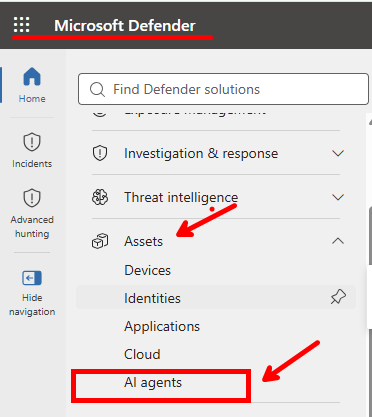
Within Microsoft Defender XDR, administrators can navigate to:
Assets → AI Agents
This experience provides a centralized inventory of AI assets discovered across the environment.
The inventory currently includes two major categories of AI resources:
Cloud AI Agents
These are cloud-managed AI agents deployed through platforms such as:
- Microsoft Copilot Studio
- Microsoft AI Foundry
- Organizational AI services
- Enterprise-developed AI assistants
Security teams can use this inventory to understand ownership, deployment status, security posture, and exposure risk across cloud-based AI implementations.
Local AI Agents
The Local Agents experience focuses on AI tools discovered directly on managed endpoints through Microsoft Defender for Endpoint.
These may include:
- AI chat applications
- Local AI engines
- Open-source AI tools
- AI development frameworks
- Endpoint-based generative AI software
This visibility is especially valuable for identifying potential shadow AI activity that may otherwise go unnoticed.
What Security Teams Can Do With AI Agent Inventory
The AI Agent inventory provides much more than a simple asset list.
It enables security teams to:
Discover Shadow AI
One of the biggest challenges organizations face today is uncontrolled AI adoption. Employees often experiment with AI tools before security or governance teams become aware of them. Defender helps identify these tools and bring them under governance.
Monitor Enterprise AI Usage
Organizations can better understand how AI technologies are being used across departments, workloads, and managed devices.
Investigate AI Security Risks
Security teams gain visibility into AI-related risks, exposure paths, and investigations that may be associated with AI assets.
Perform Advanced Hunting
Analysts can correlate AI-related activity through Advanced Hunting, allowing deeper investigation of security events involving AI systems.
Assess AI Security Posture
By integrating AI assets into Microsoft’s security ecosystem, organizations can evaluate security findings, configurations, and exposure indicators related to AI deployments.
The Most Common Cause of Missing AI Agent Visibility
Many organizations have invested significant effort in deploying custom Unified RBAC roles. These custom roles are often designed for:
- Security Operations Centers (SOCs)
- Threat hunters
- Incident response teams
- Security engineering teams
- Cybersecurity analysts
The goal is clear, to provide only the permissions required for the job. However, many customers discover that users assigned these custom roles cannot access the AI Agents experience even when they have permissions for Microsoft Defender. A common symptom looks like this:
- Analyst cannot see AI Agents.
- Security engineer cannot see AI Agents.
- Administrator elevates to Global Administrator.
- AI Agents immediately become visible.
This behavior typically indicates that the Unified RBAC role is missing one or more required permissions or data source assignments.
The Missing Configuration Most Organizations Overlook
In my experience, the issue is rarely the role itself. The most common oversight is that the role assignment does not include the required:Security for AI data source.
Even if analysts possess appropriate Defender permissions, access to AI inventory information is dependent on the correct data source assignment.
Without it, users may experience:
- Missing AI Agent tabs
- Incomplete AI inventory views
- Missing AI posture information
- Limited AI investigation capabilities
Recommended Unified RBAC Permissions
For security analysts and investigators, the custom role should include at minimum:
| Permission Area | Access |
|---|---|
| Device Inventory / Asset Management | Read |
| Advanced Hunting | Read |
| Vulnerability Management | Read |
These permissions provide:
- AI asset visibility
- Investigation capabilities
- Security posture insights
- Advanced Hunting access
Most importantly, they allow analysts to perform their jobs without requiring broad administrative privileges.
Don’t Forget the Security for AI Data Source
After validating permissions, review the role assignment itself.
Navigate to:
Microsoft Defender Portal
→ System → Permissions → Roles → Select Custom Role → Assignments → Create Assignment → Data and Scope
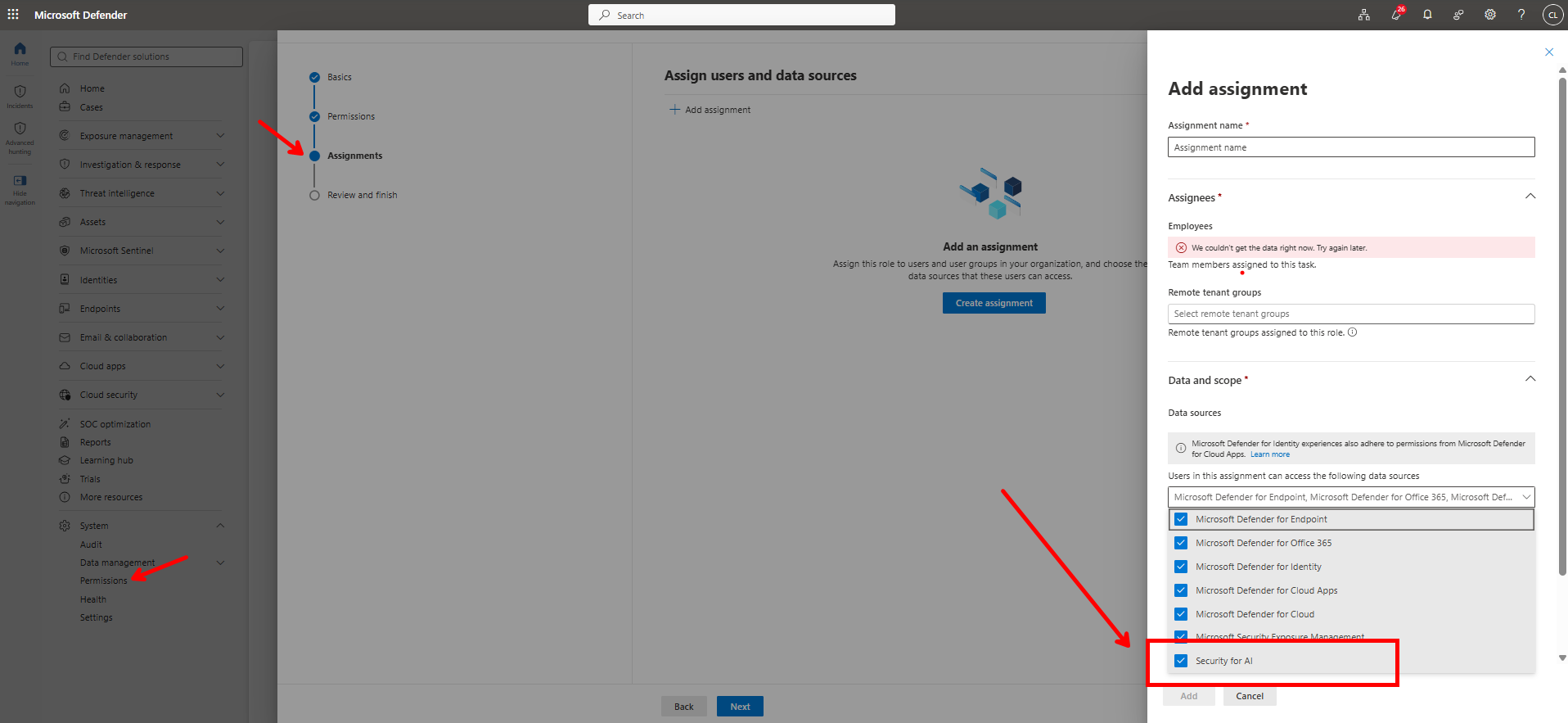
During configuration, verify that the following data source is enabled:
✅ Security for AI
This setting is essential.
Without this assignment, users may have all necessary Defender permissions and still be unable to access AI inventory data.
The Security Outcome Organizations Want
After the role is properly configured, users should be able to access: Assets → AI Agents
without requiring assignment to:
- Global Administrator
- Security Administrator
- AI Administrator
Final Thoughts
As AI becomes embedded into every business process, AI asset visibility is quickly becoming as important as endpoint visibility, identity visibility, and cloud workload visibility. Organizations should regularly review their Microsoft Defender Unified RBAC configurations to ensure the right teams have access to AI security insights without relying on highly privileged administrative roles.
If your analysts cannot see the AI Agent inventory experience, start by verifying three things:
- Required Defender permissions are assigned.
- Appropriate role assignments exist.
- The Security for AI data source is enabled.
In many environments, resolving these three configuration areas immediately restores AI Agent visibility and helps security teams govern AI adoption with confidence. As AI continues to transform the enterprise, maintaining visibility, governance, and security around AI assets will become a foundational responsibility of every modern SOC.

