Defender for Server without Azure ARC – “Arc-less”.

Licensing Model Migration Plan

Summary

Organizations can now deploy Endpoint Detection and Response (EDR) without Azure Arc. This option is perfect for customers with mixed and hybrid server environments who want to consolidate protection under the Defender for Servers licensing model. The new “arc-less” capability is a tenant-level setting that automatically switches the licensing model from a billable SKU (Microsoft Defender for Endpoint for Server) to consumption in Azure using Defender for Cloud (either P1 or P2), without additional agent deployments. This means that we can deploy Defender for Endpoint from the Microsoft 365 Defender portal using the onboarding package or script, with billing and licensing being managed through Azure/Defender for Server, and without the need for additional agents, extensions, or products.

Direct onboarding integrates Defender for Endpoint with Defender for Cloud without additional software on your servers. Once enabled, it displays non-Azure server devices in Defender for Cloud under a designated Azure Subscription (for licensing, billing, alerts, and security insights) and in the Microsoft Defender Portal. Note that this “arc-less” mechanism does not include server management capabilities like Azure Policy or Guest configuration. For those additional features, the use of Azure Arc agent is required.

Switching from Direct onboarding to Azure Arc incurs no additional cost (Unless changing from P1 to P2). If you need to collect logs via AMA or use other unsupported features, you can install the Azure Arc agent without offboarding from Defender for Endpoint.

Simplified step-by-step guidance to Transitioning from MDE SKU to Defender for Server P1/P2

  1. Create a new subscription or identify which current subscription will be used for MDE integration.
  2. Enable Defender for Server P1/P2 licenses in the selected subscription
  3. Enabled Direct Onboarding in the subscription
    1. If Defenders for Servers is off for this subscription when Direct Onboarding is Enabled – Defenders for Servers P1 will be enabled for it automatically
  4. Continue onboarding the server to Microsoft Defender for Endpoint using the onboarding script via GPO or SCCM or the current onboarding mechanisms.
  5. All server will be automatically added into the designated subscription only for licensing applications.

How to Enable Defender for Server with Direct Onboarding and a Designated Subscription

  1. Go to Defender for Cloud > Environment Settings > Direct onboarding.
  2. Switch the Direct onboarding toggle to On.
  3. Select the subscription you would like to use for servers onboard directly with Defender for Endpoint.
  4. Select Save.

Unveiling Insights with Microsoft Defender for Endpoint: Analyzing Daily Activity and Data Size

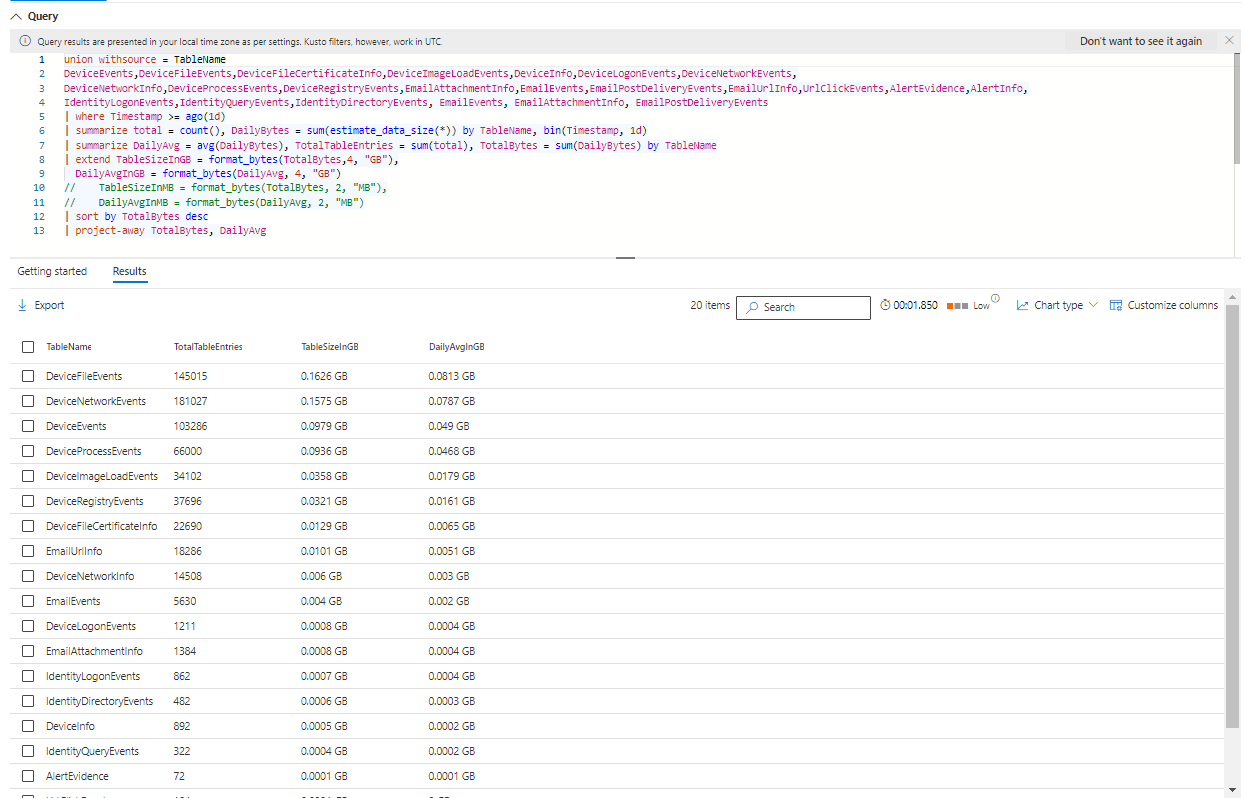
In the dynamic landscape of cybersecurity, staying ahead of potential threats requires a keen understanding of the data generated by security tools. Microsoft Defender for Endpoint stands as a stalwart guardian, offering robust protection against evolving risks. To harness the full potential of Defender for Endpoint, we turn our attention to the power of the Kusto Query Language (KQL). In this blog post, we embark on a journey through a comprehensive KQL script meticulously crafted for hunting and analyzing data within Defender for Endpoint. This script serves as a beacon, illuminating the path to unlocking valuable insights into daily activities and data sizes across diverse tables. Join us as we dissect each section of this script, revealing the intricacies that make it an indispensable asset in the arsenal of cybersecurity professionals.

Complete KQL Script

union withsource = TableName

DeviceEvents, DeviceFileEvents, DeviceFileCertificateInfo, DeviceImageLoadEvents, DeviceInfo, DeviceLogonEvents, DeviceNetworkEvents,
DeviceNetworkInfo, DeviceProcessEvents, DeviceRegistryEvents, EmailAttachmentInfo, EmailEvents, EmailPostDeliveryEvents, EmailUrlInfo, UrlClickEvents, AlertEvidence, AlertInfo,
IdentityLogonEvents, IdentityQueryEvents, IdentityDirectoryEvents, EmailEvents, EmailAttachmentInfo, EmailPostDeliveryEvents

| where Timestamp >= ago(1d)
| summarize total = count(), DailyBytes = sum(estimate_data_size(*)) by TableName, bin(Timestamp, 1d)
| summarize DailyAvg = avg(DailyBytes), TotalTableEntries = sum(total), TotalBytes = sum(DailyBytes) by TableName
| extend TableSizeInGB = format_bytes(TotalBytes,4, "GB"),
DailyAvgInGB = format_bytes(DailyAvg, 4, "GB")
// TableSizeInMB = format_bytes(TotalBytes, 2, "MB"),
// DailyAvgInMB = format_bytes(DailyAvg, 2, "MB")
| sort by TotalBytes desc
| project-away TotalBytes, DailyAvg
  • Union Operation:
    • In this section, we use the union operator to combine data from multiple tables. The withsource option adds a column named TableName to identify the source table for each record.
  • Filtering by Timestamp:
    • This line filters the records based on the Timestamp field, selecting only those that occurred within the last 1 day (ago(1d)).
  • Summarization:
    • The summarize statement calculates the total count and daily sum of estimated data size for each table. The results are aggregated by TableName and binned Timestamp into 1-day intervals.
  • Further Summarization:
    • Another summarize statement further aggregates the data, calculating the average daily bytes (DailyAvg), total table entries (TotalTableEntries), and total bytes (TotalBytes) for each table.
  • Extension with Size Formatting:
    • The extend statement adds new columns to the result, formatting the total bytes and daily average bytes into gigabytes.
  • Sorting and Projecting:
    • The sort statement arranges the results in descending order based on total bytes (TotalBytes). The project-away statement removes unnecessary columns (TotalBytes and DailyAvg) from the final output.

Conclusion:

By delving into the intricacies of this KQL script, we’ve uncovered a powerful approach to extracting valuable insights from Defender for Endpoint data. This script not only aggregates and summarizes data but also formats it for easy interpretation. Incorporate this script into your security analysis toolkit to gain a comprehensive understanding of daily activities and data sizes, empowering you to make informed decisions to enhance your organization’s cybersecurity posture.